
Shooting drills and workouts you can do alone, and how to track them
By Matthew Parrott, who makes Tally Hoops ·
Shooting on your own is where most reps happen, and also where they're easiest to waste. A drill with a fixed shape turns a pile of shots into a number you can beat next time. Here are the four built into Tally Hoops, what each one trains, and how the app grades them.
Free to download · iPhone and Apple Watch
What makes a solo drill worth repeating
A good solo drill has one thing a free shoot-around doesn't: the same shape every time. Same shot, same number of attempts, same rule for what counts. Then 18 of 25 this week means something next to 15 of 25 last week, and you can see your stroke improving instead of guessing.
Each built-in drill in Tally Hoops comes in three versions, one each for 3 Pointers, Free Throws and Freestyle (any shot you like), so the same drill works whatever you're practising that day.
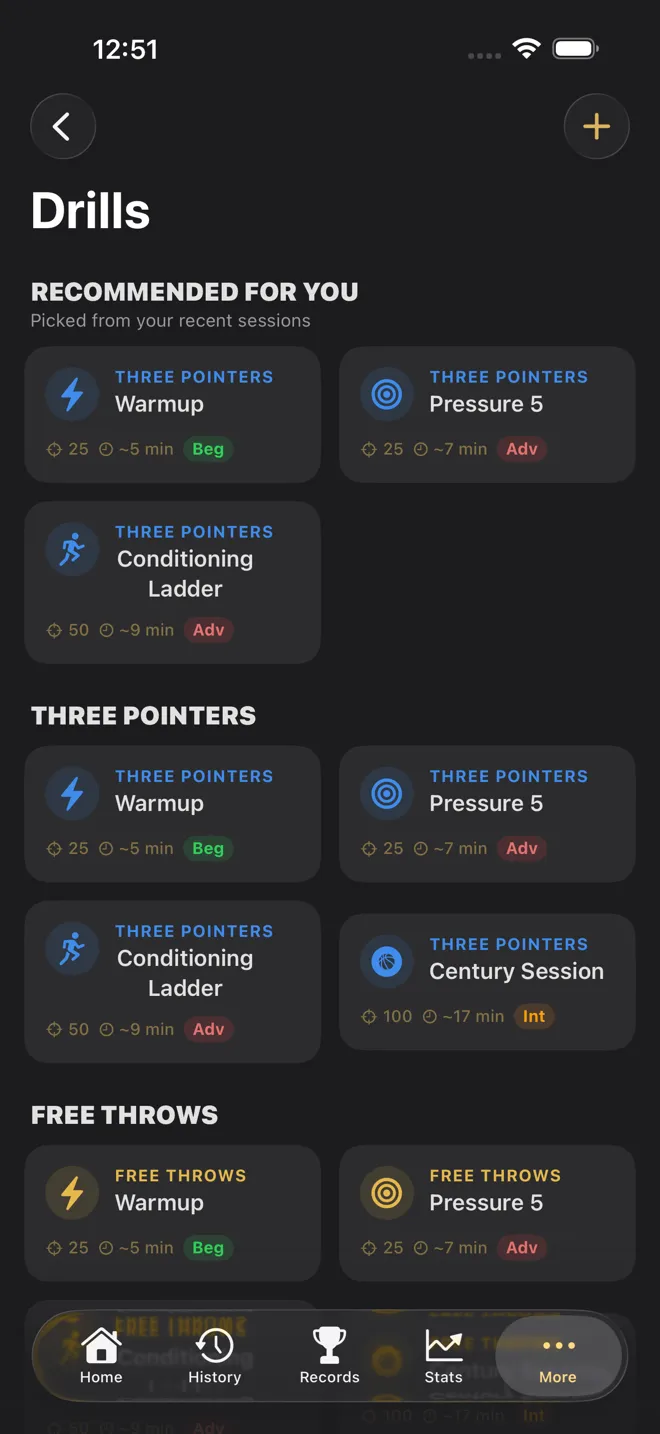
The four built-in drills
Warmup: 25 shots
"25 reps to find your stroke. Keep your form clean — make-percentage matters more than speed." It's the drill to start every session with, and the one to use when you're changing something about your shot, because it's short enough to keep your attention on form. About five minutes. Free.
Century Session: 100 shots
A volume benchmark. One hundred shots is long enough for fatigue to show, so it tells you what holds up late in a workout, not just what you can do fresh. Run it once a week and the trend is a clean read on your consistency. About 17 minutes.
Pressure 5: five in a row, five times
Make five in a row to clear a rung. A miss sends your run back to zero, but it never takes away a rung you've already cleared, and the drill is done when all five rungs are. It's the closest thing to game pressure you can build alone: every shot after the third make of a run starts to feel like it matters. About seven minutes, longer on a cold day.
Conditioning Ladder: five sets of ten
Fifty shots in five sets of ten. A set clears when you hit the drill's mark, and a missed set doesn't stop you moving on to the next. It's built for holding your form when your legs get heavy, so go hard between sets: run the lane, sprint to half court and back, whatever gets your heart rate up. The app doesn't time the rest; you do. About nine minutes of shooting.
| Shot type | A Conditioning Ladder set clears at |
|---|---|
| Free Throws | 8 of 10 |
| 3 Pointers | 4 of 10 |
| Freestyle | 6 of 10 |
How drills are graded
Every finished drill earns Bronze, Silver or Gold for its accuracy, measured against what's realistic for the shot:
| Shot type | Bronze | Silver | Gold |
|---|---|---|---|
| Free Throws | 60% | 75% | 90% |
| 3 Pointers | 30% | 40% | 50% |
| Freestyle | 40% | 55% | 70% |
Pressure 5 and Conditioning Ladder can also earn their tier from rungs: three cleared is Bronze, four is Silver and all five is Gold, and you get whichever tier is higher. A drill cut very short (under a quarter of its shots) isn't graded, so a quick five shots can't hand you a Gold.
Each drill keeps its own page: your personal best with the tier you're chasing next, your recent form, how often you've run it over the last 12 weeks, and every past attempt. Badges mark 7, 25 and 100 drills completed.
How to run a drill
On iPhone
- Go to More → Drills and pick a drill, or one from Recommended for you, which picks from the shot type you've been practising.
- Tap Start Drill. It runs in Assist Mode: tap Make or Miss, or turn on voice and say "make" or "miss" after each shot.
- The header shows your shot count and, for the rung drills, which rung you're on. A banner tells you when you clear a rung and when you reach the target.
- Tap End Session when you're done. The drill is saved to your history like any other session.
On Apple Watch
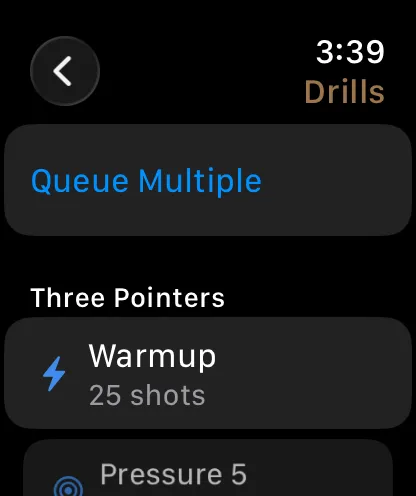
- On the Start screen, open Drills. They're grouped by shot type.
- Pick one, or tap Queue Multiple to line up several, for example a Warmup on free throws and then a Century Session on threes. Next Drill moves you along.
- Log each shot with the Digital Crown or Double Tap. When you reach the drill's shot count the watch says Drill Complete!
On the watch, every drill runs to its shot count: Pressure 5 is 25 shots and Conditioning Ladder is 50, graded on accuracy. To play them by their rung rules, run them in Assist Mode on iPhone.
Build your own
Tap + on the Drills screen to make a drill of your own: pick the shot type and a number of shots, anywhere from 1 to 500. A custom drill is a fixed-volume set, so it's the way to make your favourite workout repeatable, say 200 free throws or 50 corner threes. You can have two custom drills on the free version, and as many as you like with Premium.
Putting it together
A simple week of solo shooting can be built from just these: a Warmup every session, a Century Session once a week as your benchmark, and Pressure 5 or the Conditioning Ladder on the days you want it to hurt a bit. Keep the shot type the same for a few weeks and the drill pages will show you, in numbers, whether it's working. For more on reading those numbers, see how to track your shooting percentage.
Checked against Tally Hoops 3.11 on October 14, 2026.
Questions
What are good shooting drills to do alone?
Drills with a fixed shape: the same number of shots, or the same rule, every time. A 25-shot warmup, a 100-shot volume set, a make-five-in-a-row ladder and short sets of ten when you're tired cover form, volume, pressure and conditioning, and because the shape doesn't change you can compare one session with the next.
How many shots should a solo shooting workout be?
Enough that one make or miss doesn't swing the result. Tally Hoops' built-in drills run from 25 to 100 shots, and its drill grades ignore anything under a quarter of the drill's shots (at least 5). Pick a number you can repeat every session rather than the biggest number you can manage once.
Are the drills free?
Warmup is free for each shot type, and you can build two drills of your own. Premium unlocks Pressure 5, Conditioning Ladder and Century Session for every shot type, and unlimited custom drills.
Can I run a drill on Apple Watch?
Yes. Open Drills from the watch's Start screen, or use Queue Multiple to run several back to back. On the watch a drill ends at its shot count; the rung rules of Pressure 5 and Conditioning Ladder run in Assist Mode on iPhone.
Can Siri start a drill?
Yes: say "Start drill in Tally Hoops", or name it, as in "Start Century Session in Tally Hoops".