
Find the heart rate where your shot falls off
Every shot you log on Apple Watch carries your heart rate at that moment. After a few sessions, Tally Hoops can show you something a box score can't: the heart rate where your make percentage drops, and by how much.
Scan to download
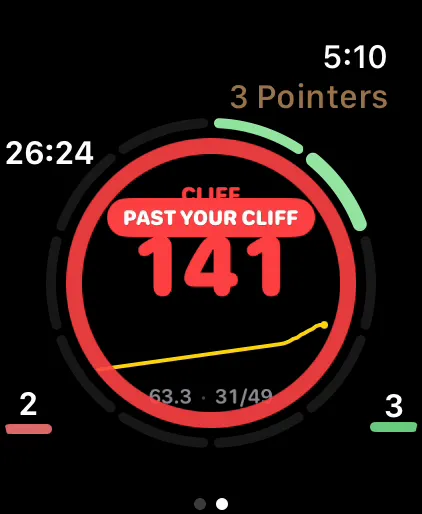
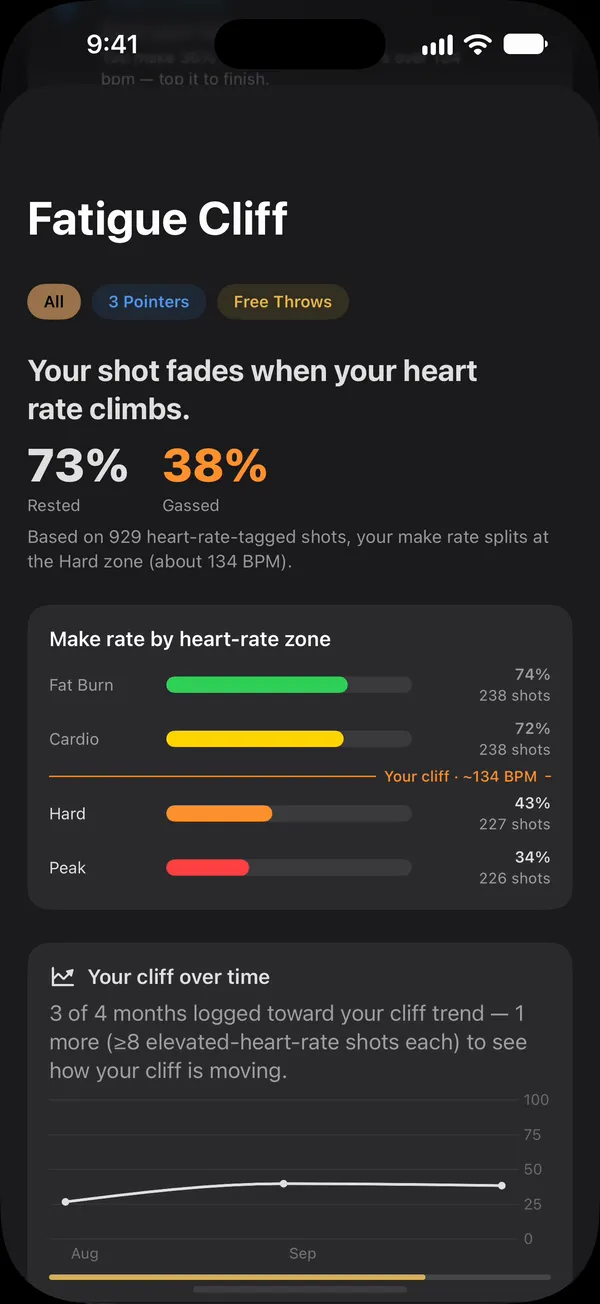
Try it: move the heart rate
This is an example player's cliff. Slide the heart rate up and watch what happens to the make percentage, and to the watch, once it passes about 134 bpm.
Fresh, below 134 bpm
73%
70 of 96 shots made
Gassed, above 134 bpm
38%
16 of 42 shots made
At 120 bpm you're in Cardio, where this player makes 72% (33 of 46).
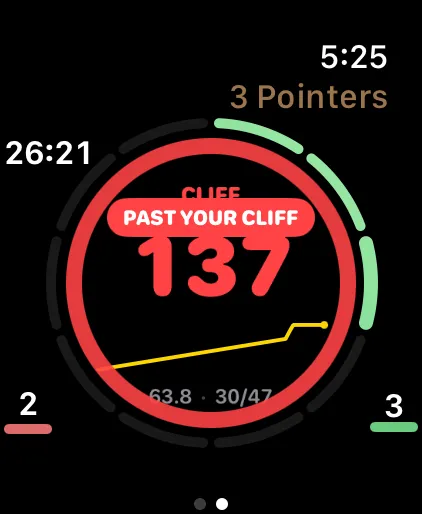
Stay above your cliff for 20 seconds and the watch taps your wrist twice, then shows this banner on your next shot.
Show the numbers as a table
| Zone | Heart rate | Made | Make % |
|---|---|---|---|
| Warm Up | 84–100 bpm | 9 of 12 | 75% |
| Fat Burn | 101–117 bpm | 28 of 38 | 74% |
| Cardio | 118–134 bpm | 33 of 46 | 72% |
| Hard | 135–151 bpm | 12 of 30 | 40% |
| Peak | 152–168 bpm | 4 of 12 | 33% |
Why heart rate, and why every shot
Every player knows their shot gets worse when they're tired. What almost nobody knows is when. Is it after 50 shots? After the third sprint? At a certain heart rate? Game minutes and shot counts are guesses at fatigue; your heart rate is a measurement of it.
A watch session in Tally Hoops is a workout, so the watch is reading your heart rate the whole time. When you log a shot, with the Crown, Double Tap or a press and hold, that shot is saved with your heart rate at that second. Do that across a few sessions and you have something a camera can't give you: your makes and misses sorted by how hard your body was working when you took them.
How Tally Hoops finds your cliff
- Zones from your own maximum. Your heart rate is split into zones at 50, 60, 70, 80 and 90 percent of your maximum: Warm Up, Fat Burn, Cardio, Hard and Peak. Your maximum comes from your age in Apple Health, or from the highest heart rate you've recorded if your age isn't there.
- Enough shots to trust it. The cliff waits for at least 40 shots with heart rate, and a zone only counts once it has at least 8 attempts. Resting shots, below half your maximum, are left out: that's where players warm up, not where they get tired.
- The biggest drop. Tally Hoops compares your make rate below and above every zone edge and picks the edge where it falls the most, with enough of your shots on each side that one hot or cold stretch can't decide it. That edge is your cliff.
- One cliff per shot type. Free throws and threes get tired differently, so each shot type gets its own cliff once it has enough shots.
The result reads like this: 81% rested, 46% gassed, cliff at about 134 bpm. That's the example on the iPhone screen above, from 646 shots.
The tap on your wrist
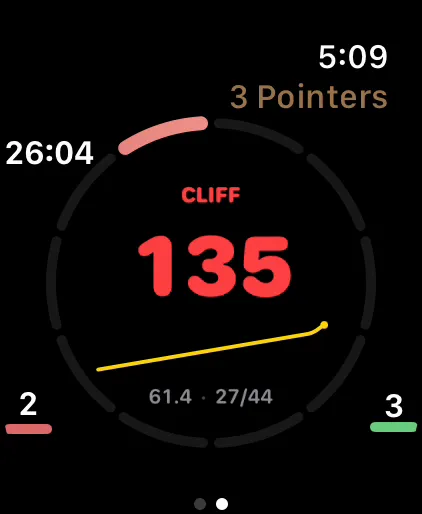
Once you have a cliff, the watch knows it. During a session the Heart Rate face reads CLIFF in red when you're past it, and the heart-rate page says Above your cliff. If your heart rate holds above the cliff for 20 seconds, the watch taps your wrist twice and shows a Past your cliff banner. It waits for your next shot to do it, so it never interrupts one.
- A heart rate that brushes the line doesn't count. It has to stay there.
- After an alert, it won't fire again until you've come back down at least 5 bpm, and never within 2 minutes.
- The wrist tap only happens in sessions that include the Heart Rate face among your session pages.
- Turn it off in More › Settings › Apple Watch › Fatigue Cliff Alert.
On iPhone, the Live Activity on your Lock Screen shows when you're above your cliff, too.
What to do with your cliff
- Practice tired, on purpose. In a game you shoot tired. Shoot a set of free throws right after a sprint and see whether your gassed number moves. The Conditioning Ladder, five sets of ten with hard work between sets, is built for holding your form when your legs get heavy.
- Use the alert as a rest timer. When the watch taps, take a few breaths before the next shot and see if the make rate comes back.
- Watch it move. As your conditioning improves, the cliff should move up, or the drop should get smaller. With Premium, Tally Hoops charts your cliff month by month once you have four months with at least 8 shots above it in each.
- Compare shot types. A cliff on threes and none on free throws says something different from the other way round.
What it costs, and where your heart rate goes
Your cliff, the fresh and gassed numbers and the wrist alert are free. The month-by-month trend, along with shot percentage by heart-rate zone in Stats, is part of Premium. Your heart rate comes from Apple Health and stays on your devices and in your private iCloud; Tally Hoops has no account and no server of its own to send it to.
Checked against Tally Hoops 3.11 on October 14, 2026.
Questions
What is a fatigue cliff in basketball?
It's the heart rate where your shooting percentage drops off. Tally Hoops finds it from your own shots: every shot you log on Apple Watch carries your heart rate, and the cliff is the point where your make rate falls the most between one heart-rate zone and the next.
How many shots does Tally Hoops need to find my cliff?
At least 40 shots logged on Apple Watch with heart rate, with enough shots in each zone to compare. Each shot type gets its own cliff once it has enough shots of its own.
Do I need an Apple Watch for the Fatigue Cliff?
Yes. The cliff comes from the heart rate the watch records at the moment you log each shot. Sessions logged only on iPhone don't have that.
Is the Fatigue Cliff free?
Yes. Your cliff, fresh-against-gassed numbers and the wrist alert are free. Seeing how your cliff moves from month to month is part of Premium.
Can I turn off the fatigue cliff alert?
Yes. In the iPhone app, go to More › Settings › Apple Watch and turn off Fatigue Cliff Alert. The wrist tap also only happens in sessions that include the Heart Rate face.